

How to Choose Security Lighting
Lighting a space at night is critical not only for capturing high-quality surveillance footage but also for deterring crime. Whether you’re managing a large-scale commercial site or upgrading a home security setup, the right lighting can significantly enhance overall protection.
Below are key considerations to help you select the best lighting for your security system.
Wavelength
Choose the Right Light Type: Infrared, White, or Hybrid
Power Input
Match the Light’s Power Input to Your System
Range & Angle
Match your camera’s field of view (FOV) to the light’s range & angle.
Light Wavelength Options
1. Infrared Light – Discreet surveillance without visible light
Infrared lighting, typically at 850nm, is invisible to the human eye but clearly visible to most IR-capable security cameras. An IR Illuminator allows discreet, around-the-clock surveillance. Scenes illuminated with IR will appear well-lit in camera footage while remaining completely dark to human observers. Infrared is commonly used in residential or environmentally sensitive areas where continuous White lighting may be a nuisance or contribute to light pollution.
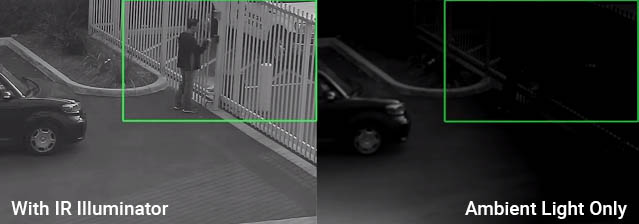
ABOVE: Left – Security camera footage with an IR Illuminator. Right: Same scene without an IR Illuminator
IR Illuminators are ideal when:
See: IR Illuminators
2. White Light – Visible Illumination and Color Imaging
White floodlights provide visible illumination that supports both security and general area lighting. When used with a security camera, they enable full-color video, allowing details such as clothing colors, vehicle colors, and other visible features to be recorded.
White light can also serve as a visual deterrent by illuminating an area when activated. However, continuous white lighting may not be appropriate in every location. In residential neighborhoods and environmentally sensitive areas, excessive nighttime lighting can become a nuisance and contribute to light pollution.
AXTON White Floodlights are designed specifically for professional security applications. Built-in I/O ports allow the floodlight to be activated by motion sensors, security cameras, alarm systems, or other compatible control devices, providing illumination only when needed.
3. Hybrid Lights Infrared + White – Both covert monitoring and visible deterrence
AXTON Hybrid lights combine both IR and white LEDs in a single unit, offering flexible functionality.
In standard operation, the light runs in IR mode for invisible camera illumination. When triggered by a system component, such as a motion detector, contact sensor, or camera via I/O ports, the white floodlight activates. The activation of the bright white floodlight signals intruders that they’ve been detected and often causes them to flee before any damage is done. After the event, the light returns to IR mode for continued covert surveillance.
See: HYBRID Lights
Power Input Options
Your lighting should match your existing power setup, especially if you’re trying to avoid complex wiring or costly trenching for outdoor installations.
Voltage Options
PoE Power Input
AXTON offers PoE, PoE+, and PoE++ lighting options. These simplify installation by using the same cabling infrastructure that powers other system components, no additional electrical wiring required.
PoE Power Levels:
PoE lights are backward-compatible: a PoE+ light can operate on a PoE++ network, but not vice versa.
See: PoE Powered Lights
Solar / Battery Power – Low Voltage Input
For remote, mobile, or solar-powered sites, AXTON offers low input voltage floodlights and IR illuminators compatible with solar powered, batteries, generators, off-grid systems. These lights are designed to work well with solar and battery output volatages.
TIP: Do More LEDs or Watts Mean Better Security Lighting?
Not necessarily. LED count and wattage describe components and power consumption, not the useful illumination reaching the target. Performance also depends on beam angle, optics, LED efficiency, wavelength, heat management, and light distribution. A well-designed, lower-wattage IR illuminator or white security light can outperform a higher-wattage unit that wastes light or distributes it poorly.
Determine the Distance and Width (Angle) of Illumination You Need
You can control the distance and the width the light illuminates by choosing the lights angle. For security camera lights, match the light to your camera’s field of view. This ensures full coverage for you camera and is more efficient reducing energy costs. For AXTON lights angles range from wide angle 360˚ lights to narrow angle, long distance 10˚ lights and angles in-between those extremes.
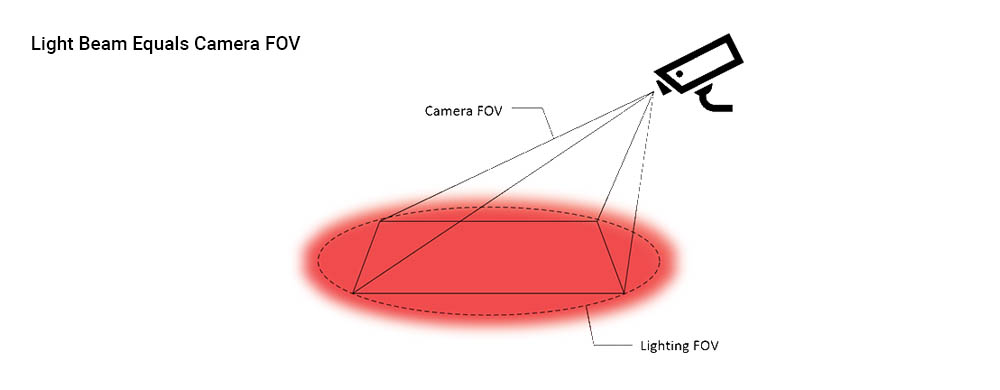
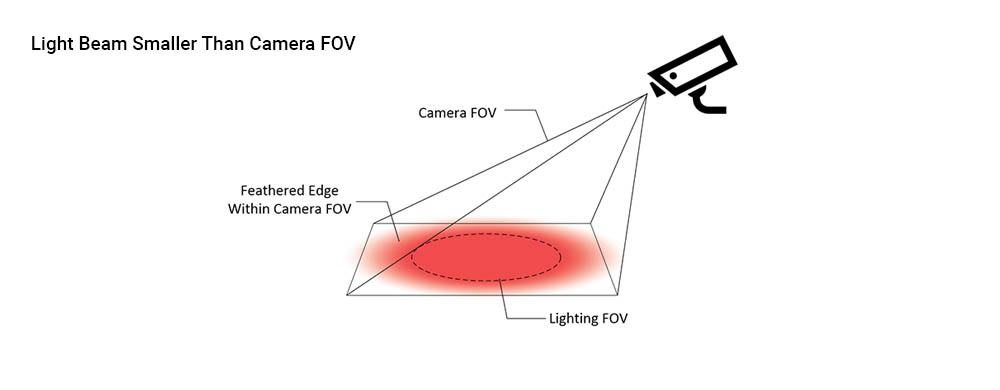
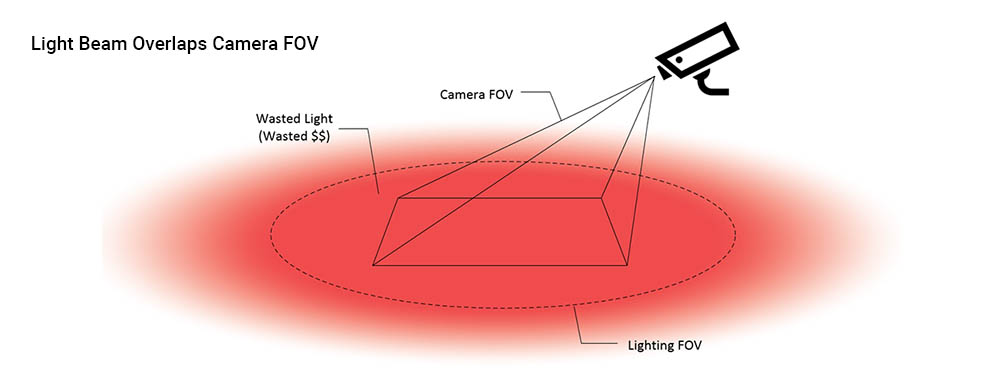
Understanding Beam Angles and Illumination Range
Choosing the correct beam angle for your lighting can significantly improve system effectiveness and reduce energy costs.
Light Control Features & Options
Day/Night Sensor or I/O Port Control – Which is best?
Most AXTON IR and white light illuminators include a built-in Day/Night Sensor and I/O ports. The built-in Day/Night Sensor works well for simple one- or two-camera installations where the light only needs to turn on when ambient light levels fall below a set threshold.
For larger or more advanced security systems, however, it is important to consider how the illuminator will synchronize with the cameras or sensors. The built-in Day/Night Sensor responds to outdoor light levels, while the camera switches to night mode based on its own day/night settings. These two thresholds may not match exactly. This timing difference can create short lapses in night surveillance, especially during dawn, dusk, storms, shaded areas, or changing light conditions.
For professional security applications, even a brief mismatch between the camera and the illuminator can leave the scene underlit at the moment the camera needs IR or white light support.
For more precise control, AXTON illuminators can be connected through the I/O ports. When using I/O control from the camera, the illuminator can turn on at the same time the camera switches to night mode. I/O ports can also be used with external sensors or other security system devices to turn the light on when triggered.
Control options vary by model. Check each product page for specific features. Hybrid illuminators use I/O control to switch between IR and white light modes, making camera or system control especially important.
Questions?
If you have questions about the best lighting for your site, feel free to contact us: call 801/519-0500 or email: Support at AXTONtech
